
Building & Automation
Lightyear Frontier Building Guide
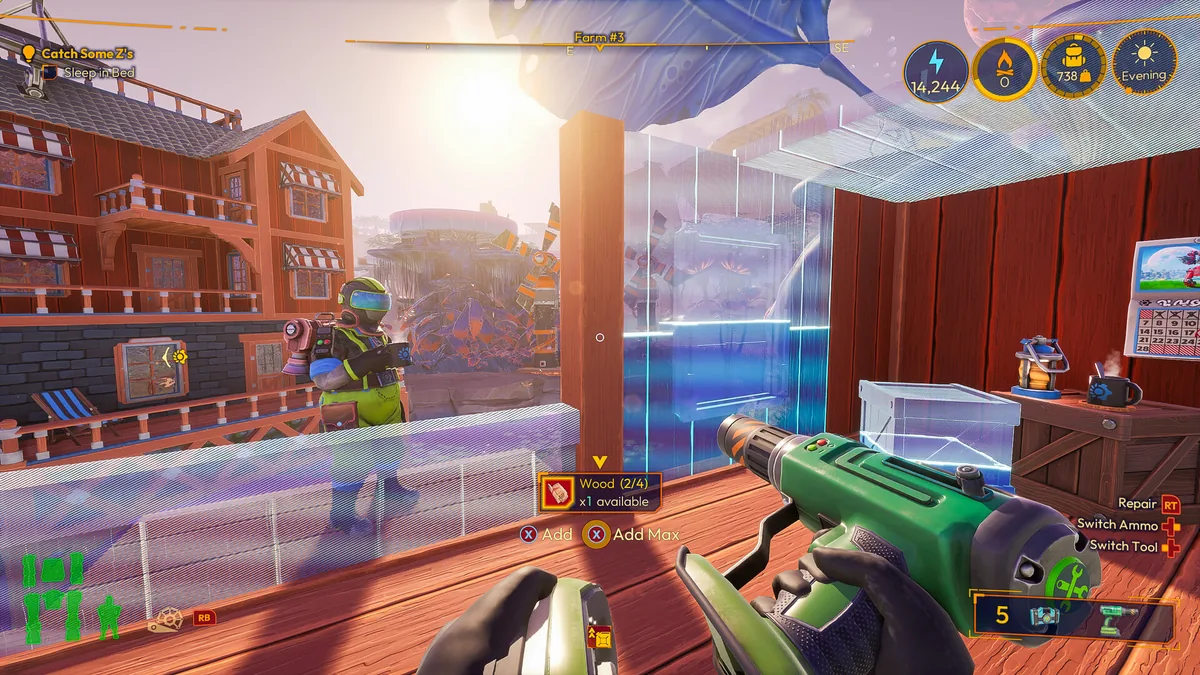
Press B to enter Build Mode and H to enter recycling mode on PC. Use Snap for clean joins and Free for custom angles. Build a Small Tent or House first, then raise Coziness with decorations and use Planning Mode to lay out the rest without spending resources.
Scope: The controls and shelter recipes are 2024 Early Access data that still describe the building flow. The Coziness buffs, Planning Mode and structural-integrity fix are 1.0 changes. Exact support radii and roof coverage shapes were not published.
On this page
Build Mode, Snap and recycling
On PC, B opens Build Mode and H opens recycling mode. Left-click places a selected piece; in recycling mode, left-click removes it. Snap aligns pieces to a grid and to each other, while Free mode lets you rotate and place at custom angles. Use Snap for floors, walls and fences, and Free for decorations or a deliberately irregular path.
The 2024 tutorial video demonstrates the two modes and the recycle key. 1.0 did not publish a changed control scheme, so these are the controls to try first; check the on-screen Build Mode prompt if a later patch remaps them.
- Press B to open Build Mode.
- Choose a piece from the build menu.
- Use Snap for aligned structures or Free for custom angles.
- Press H to recycle; left-click the piece you want to remove.
First shelter and the old recipe table
A Homestead shelter is more than decoration: it lets you sleep, advances time and grants a rest buff. The Small Tent is the cheapest first option; the House and Mansion add space and interior room for decorations. The recipes below are from the 2024 IGN guide and may have been rebalanced in 1.0.
| Shelter | 2024 recipe | Use |
|---|---|---|
| Small Tent | 20 Plant Fiber + 8 Wood | Cheapest first bed and rest point |
| House | 25 Hardwood + 12 Clay + 4 Iron Frame + 4 Clear Glass | Interior space for furniture and storage |
| Mansion | 50 Hardwood + 4 Steel Frame + 4 Fractalite Bar + 8 Clear Glass | Large late-game home |
Treat these as 2024 material costs. 1.0 rebalanced recipes and added building tiers; check the current build menu before farming a large shopping list.
Coziness and the two 1.0 buffs
Coziness is raised by furnishing the home area, not by placing one expensive object. The 2024 guide treats it as a Homestead stat tied to decorations and comfort. In 1.0, the official building article adds two named buffs: Homestead Swiftness gives 50% movement speed inside the Home Area, and the second reduces mech fuel consumption by 20%.
The exact Coziness thresholds for each level are not published in the accessible sources. Build a room you can walk through, add the decorations you have, and check the Coziness panel; do not assume a fixed number of chairs or rugs is required.
- Furnish the interior before expanding the building shell.
- Keep a clear path from the bed to the door and storage.
- Check the Coziness panel after each batch of decorations.
- Use the Home Area buffs as a reason to keep the house near the working farm.
Planning Mode and continuous building
Planning Mode is a 1.0 addition: it places holographic blueprints without consuming resources. Use it to test the footprint of a house, a processing row or a road before you commit materials. It is especially useful on uneven ground, where a full building can be expensive to move.
1.0 also adds continuous building and new decoration tiers. The bathroom decorations unlock after 16 deliveries and the kitchen decorations after 31, according to the official building article. Those numbers are delivery counts, not a currency cost.
Roof checks and structural integrity
The 1.0 building article says the roof-efficiency check now looks upward from the building center and four corners. A roof that covered an old 2024 layout may not count the same way. Build the roof over the actual room, then check whether the room receives the bonus before adding another floor.
The official patch notes also fix incorrect structural-integrity calculations: floating structures and overly optimistic support can now collapse. A 1.0 review video said the reviewer did not have to worry about structural integrity for simple modular builds, but that is a player observation, not a guarantee. If a piece refuses to place or a structure falls, add support rather than forcing it.
The exact maximum overhang, support radius and height limit were not published. Use the build preview and test a small section before repeating it.
Questions
Common questions
How do I enter Build Mode?
On PC, press B to enter Build Mode and H for recycling mode. Snap aligns pieces; Free lets you place at custom angles. Check the Build Mode prompt if a later patch changes the binding.
Why is my building falling or refusing support?
1.0 fixed structural-integrity calculations, so floating sections and thin support can collapse. Add supports and test a small section before repeating it. The exact overhang and support radius are not published.
How does the roof bonus work in 1.0?
The official building article says the check looks upward from the building center and four corners. A 2024 roof layout may not cover the same points, so rebuild the roof over the current room and check the bonus.
What does Coziness do?
Coziness is a Homestead comfort stat. 1.0 adds Homestead Swiftness (50% movement speed inside the Home Area) and a second buff that reduces mech fuel consumption by 20%. Exact level thresholds were not published.
Sources
What this page is based on
- IGN – Homesteads ↗2024 shelter recipes, rest buff and Homestead overview.
- Official 1.0 building article ↗Planning Mode, Coziness buffs, roof check, decoration delivery counts.
- Official 1.0 launch notes ↗Structural-integrity fix and building changes.
- Magic Flyin Potato – beginner video ↗2024 Build Mode, Snap/Free and recycling key demonstration.
Facts checked